Workspace
Physical
Standing Desk
The page is for the following standing desk unit with the touch based input remote as seen on the picture.
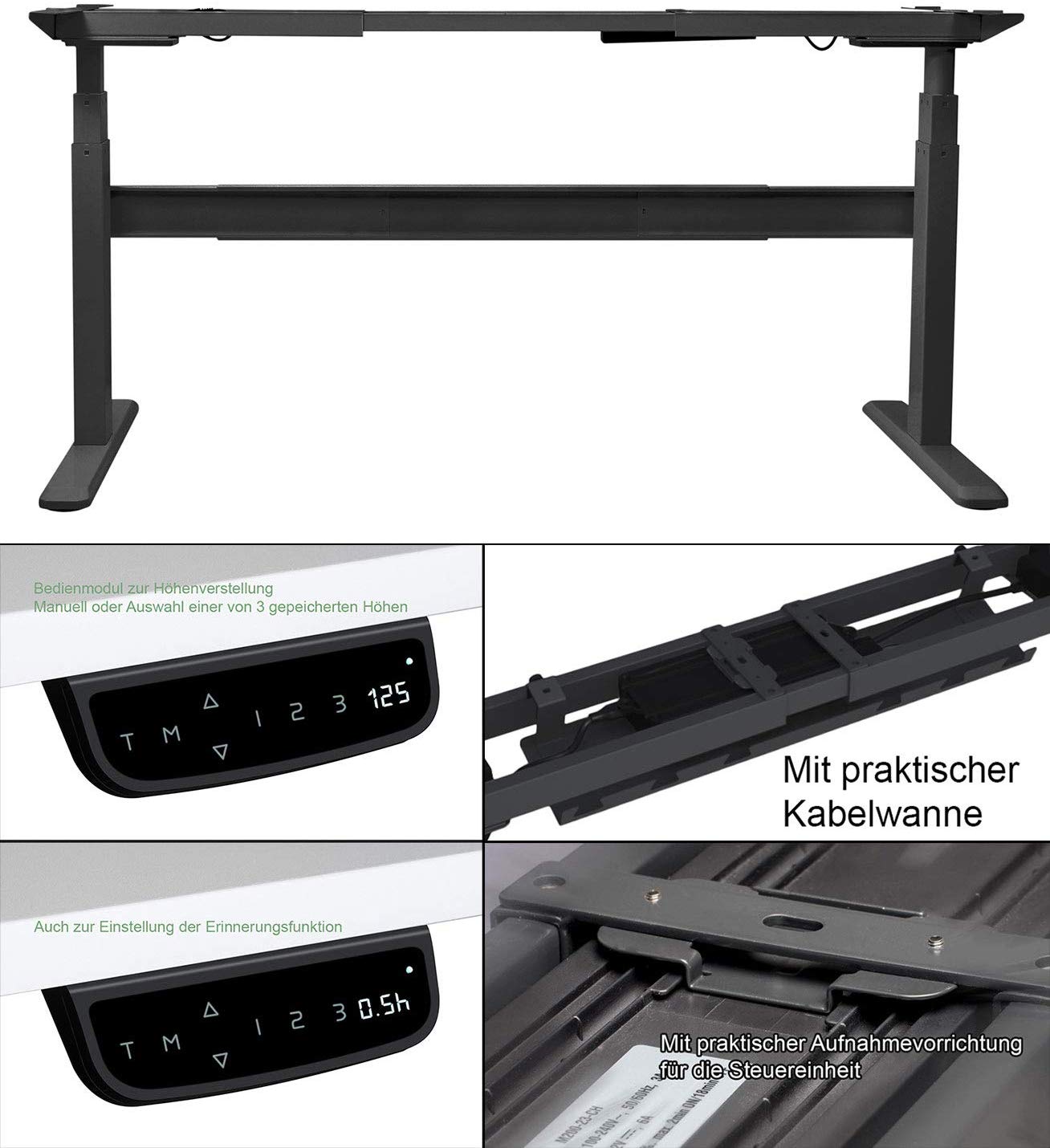
Controller Setup
See attached pdf manual for details.
Software
Xorg AMDGPU
I own a AMD Vega64 and an using it with i3 on Manjaro. The misaligned monitors on the greeter and the manual resolution and refresh rate switching were super annoying.
Setup
- Updated Manjaro with kernel >5.0 including amdgpu kernel driver
- AMD Vega64
- Monitor capable of 144Hz and Freesync
- Second Monitor not capable of those things
144Hz modline
This was relative simple, amdgpu is pretty verbose on startup and prints all available modlines for the connected outputs on the card into /var/log/Xorg.0.log.
With a simple less /var/log/Xorg.0.log I quickly found it somehwere along with
[     6.454] (II) AMDGPU(0): Printing probed modes for output DisplayPort-2
[     6.454] (II) AMDGPU(0): Modeline "2560x1440"x60.0  241.50  2560 2608 2640 2720  1440 1443 1448 1481 +hsync -vsync (88.8 kHz eP)
[     6.454] (II) AMDGPU(0): Modeline "2560x1440"x143.9  586.00  2560 2568 2600 2640  1440 1465 1473 1543 +hsync -vsync (222.0 kHz e)
[     6.454] (II) AMDGPU(0): Modeline "2560x1440"x119.9  482.64  2560 2568 2600 2640  1440 1447 1455 1525 +hsync -vsync (182.8 kHz e)
[     6.454] (II) AMDGPU(0): Modeline "2560x1440"x99.9  398.23  2560 2568 2600 2640  1440 1496 1504 1510 +hsync -vsync (150.8 kHz e)
and used the one with my desired configuration.
xorg config
To get my setup working as expecting without manual configuration on every startup, I needed to place a persistent config in the xorg config folder so e.g. /etc/X11/xorg.conf.d/10-monitors.conf.
There, I configured both my GPU driver and the monitors like following.
The Monitor sections are straightforward.
DisplayPort-2 is my 144Hz display, so I added the modline as a new preset 2560x1440_full and used it in the PreferredMode option.
Further I enabled DPMS, the Display Power Management Signaling so the system could turn of the Montiors just in case.
The Device section contains the preferred options for the given GPU drive, in my case amdgpu. I enabled TearFree as well as VariableRefresh, the first one should reduce tearing on both displays while the latter one enables FreeSync on my 144Hz monitor. After a reboot, my monitor indeed reported it was using FreeSync!
Section "Monitor"
  Identifier "DisplayPort-2"
  Modeline "2560x1440_full"  586.00  2560 2568 2600 2640  1440 1465 1473 1543 +hsync -vsync
  Option "Primary" "true"
  Option "PreferredMode" "2560x1440_full"
  Option "DPMS" "true"
EndSection

Section "Monitor"
  Identifier "DisplayPort-1"
  Option "PreferredMode" "2560x1440_59.95"
  Option "LeftOf" "DisplayPort-2"
  Option "DPMS" "true"
EndSection

Section "Device"
  Identifier "AMD-VEGA"
  Driver "amdgpu"
  Option "VariableRefresh" "true"
  Option "TearFree" "true"
EndSection
fan2go
My setup on ws01.havok.xyz
This will setup the fans to both value temps of cpu + ssd or gpu + ssd.
fans:
  - id: radiator_fans
    minPwm: 60
    startPwm: 60
    hwmon:
      platform: nct6798-isa-0290
      index: 5
    curve: cpu_ssd_curve

  - id: case_top_fans
    hwmon:
      platform: nct6798-isa-0290
      index: 2
    neverStop: false
    curve: cpu_ssd_curve

  - id: case_gpu_front
    hwmon:
      platform: nct6798-isa-0290
      index: 3
    neverStop: false
    curve: gpu_ssd_curve

  - id: case_gpu_rear
    hwmon:
      platform: nct6798-isa-0290
      index: 4
    neverStop: false
    curve: gpu_ssd_curve

sensors:
  - id: cpu
    hwmon:
      platform: k10temp-pci-00c3
      index: 1
  - id: chipset
    hwmon:
      platform: asusec-isa-0000
      index: 1
  - id: gpu
    hwmon:
      platform: amdgpu-pci-0b00
      index: 2
  - id: ssd_1
    hwmon:
      platform: nvme-pci-0100
      index: 1
  - id: ssd_2
    hwmon:
      platform: nvme-pci-0400
      index: 3

curves:
  - id: cpu_curve
    linear:
      sensor: cpu
      steps:
        - 0: 80
        - 60: 80
        - 70: 80
        - 75: 124
        - 95: 255

  - id: ssd_curve
    linear:
      sensor: ssd_1
      steps:
        - 0: 80
        - 50: 80
        - 60: 120
        - 65: 150
        - 70: 255

  - id: gpu_curve
    linear:
      sensor: gpu
      steps:
        -  0: 80
        - 65: 80
        - 70: 80
        - 95: 255

  - id: cpu_ssd_curve
    function:
      type: maximum
      curves:
        - cpu_curve
        - ssd_curve

  - id: gpu_ssd_curve
    function:
      type: maximum
      curves:
        - gpu_curve
        - ssd_curve
lazyvim
Fixing multiple rust-analyzer running
https://github.com/LazyVim/LazyVim/discussions/3825#discussioncomment-9937797
in ~/.config/nvim/lua/plugins add a file called mason.lua with content
return {
  {
    "neovim/nvim-lspconfig",
    opts = {
      setup = {
        rust_analyzer = function()
          return true
        end,
      },
    },
  },
}
Removing unwanted Markdown warnings
in ~/.config/nvim/lua/plugins add a file lint.lua
return {
  {
    "mfussenegger/nvim-lint",
    opts = {
      linters = {
        markdownlint = {
          args = { "--disable", "MD013", "--disable", "MD012", "--" },
        },
      },
    },
  },
}
Add prefered hidden file viewing
in ~/.config/nvim/lua/plugins add a file neo-tree.lua
return {
  "nvim-neo-tree/neo-tree.nvim",
  opts = {
    filesystem = {
      filtered_items = {
        visible = false,
        show_hidden_count = true,
        hide_dotfiles = false,
        hide_gitignored = false,
        hide_by_name = {
          -- ".git",
          -- '.DS_Store',
          -- 'thumbs.db',
        },
        never_show = {
          ".git",
        },
      },
    },
  },
Add prefered color scheme
in ~/.config/nvim/lua/plugins add colorscheme.lua
return {
  -- add gruvbox
  { "catppuccin/nvim" },

  -- Configure LazyVim to load gruvbox
  {
    "LazyVim/LazyVim",
    opts = {
      colorscheme = "catppuccin",
    },
  },
}